



















Exclusive importer for Slovenia
The world's first hardware DPN! A better solution than traditional software VPNs.
The product has won numerous global awards and is extremely popular with users.
One-time setup to protect the entire network and all connected devices.
Comprehensively encrypted data ensures anonymity on the network and prevents data leakage.
Decentralised network, 7-layer firewall, DNS encryption and intelligent threat detection.
Unlimited access to your favourite content anytime.
Automatic blocking of intrusive ads, trackers and analytics. Faster browsing and more privacy on all devices.
A one-time purchase of hardware guarantees lifetime use without subscription.
€/year
€/year
€/year
€/year
€/year
€/year
DPER uses cutting-edge cybersecurity technology to give you access to most or even all VIP services - without additional subscription fees. This means unlimited access and a cleaner browsing experience.
Cost: DPNs allow lifetime use after a one-off purchase, while VPNs usually require a monthly subscription.
Ease of use: the DPN automatically unlocks regional restrictions for all devices via the Deeper (DPER) Connect app, while the VPN requires software to be installed on each device. Many devices, such as Apple TV, do not support VPN at all. DPN's smart routing feature allows traffic from different applications to automatically switch between countries without manually switching nodes.
Speed: VPNs use servers, while DPN uses the bandwidth of user nodes. In theory, VPNs can be faster, but DPN uses node aggregation technology (up to 8 users at the same time), which can increase speed up to 8 times. Smart routing further speeds up access to streaming content via nearby CDN nodes, reducing latency and buffering.
Geo-restriction unblocking: VPN addresses are often quickly detected and blocked by streaming services (such as Netflix). DPN uses users' home IP addresses, which reduces the risk of blocking.
Security: DPN combines enterprise-level security technology to filter almost all internet traffic and ads (including paid ads). It is equipped with advanced technology to detect and block cyber attacks. Without a central server, user logs are encrypted and dispersed across global nodes, further enhancing privacy protection. With VPNs, however, access logs are often stored on central servers, which means a higher risk of data leakage.
DPN's ad filtering experience differs from browser plug-ins in the following ways:
Resistance to countermeasures: browser plug-ins are more sensitive to countermeasures from websites. For example, sites such as YouTube often update their identifier codes against filtering plug-ins to prevent ad blocking. DPN's filtering based on traffic filtering can circumvent such countermeasures and provide a more stable ad blocking.
Cross-platform support: browser plug-ins usually only work on browsers on computers and cannot be used across platforms. However, DPN's ad filtering can work on multiple platforms, including iOS, Windows, Mac OS, Android, TV OS, Linux, etc. This allows for effective ad filtering on popular apps such as YouTube and Spotify.
Reminder: To use the ad filtering feature of DPN, a Deeper (DPER) SSL Root Certificate must be installed on the endpoint device, which allows the Deeper (DPER) Connect application to modify the underlying traffic.
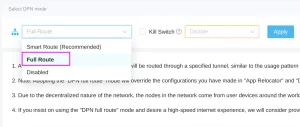
Deeper Connect by default uses a mode known as 'Smart Route'. The 'Smart Route' mode is primarily designed to bypass regional access restrictions on various websites or platforms, such as Netflix, BBC, and others. This mode only conceals or disguises the IP address for those domains that require IP verification, with the aim of maximizing the speed at which users can access these geo-blocked sites. If you wish to completely hide your IP, please go into the device's configuration interface and switch from 'Smart Route' to 'Full Route' mode. The specific steps are illustrated in the image below:
For more information on DPN and Smart Route, please see here: https://deeper-network.medium.com/a-101-on-dpns-bd5e2b7c9e25
You can reset your password using the reset button on your device. For detailed instructions, please visit: https://shop.deeper.network/blogs/tutorials/self-reset-your-deeper-connect-devices
If you still have questions, please keep your device connected to the web and contact support.deeper.network.
Yes, Deeper Connect can be configured in three ways, which are described in the story section on the project page:
Virtual Wire mode: Modem -(cable)- Deeper Connect -(cable)- Router -(wifi)- Laptop/ Phone/ TV etc.
AP Router mode: Modem/ Router -(cable)- Deeper Connect -(wifi)- Laptop/ Phone/ TV etc.
Wireless Relay mode: other Wi-Fi access points -(wifi)- Deeper Connect -(wifi)- Laptop/ Phone/ TV etc.
You need another router. All-in-One -(cable)- Deeper device -(cable)- second router.
Please watch this video for a first set-up: Deeper Connect - Proper Setup & Reboot Sequence for Troubleshooting
If the connection problem persists, please contact us via: support.deeper.network.
First check the firmware version to make sure it is higher than 1.1.17.
If the problem persists, please contact us via support.deeper.network.
For more information, please visit: https://privacy-router.com/terms-and-conditions/
Please contact sales@privacy-router.com in case of a lost package.
First you need to register on https://device-bsc.deeper.network/register and follow the guide for staking on link.
If you need further assistance, please submit a request at support.deeper.network and support will be there to help you.
It depends on how you want to invest. There are eight different levels of staking to choose from.
For more information, visit that aside. You are always welcome to submit a request to support.deeper.network for further assistance.
Make sure you have a DPR and BNB token in your Metamask wallet.
For more information on the mining prizes and rules, see here and in the staking tutorial.
You are always welcome to submit a request to support.deeper.network for further assistance.
Please check:
whether your device is permanently connected,
whether your device has been connected for more than 12 hours,
whether your On-chain status is "Yes" on the Mining/Wallet/Wallet Balance page in AtomOS,
whether your DPR balance is more than 0.21 DPR.
If you need further assistance, please submit a request at support.deeper.network.
Please check that you meet the following conditions:
The system shall operate for at least 12 consecutive hours per day,
You share more than 10 MB daily,
Do 3 random heartbeat checks per day.
Please follow this to the driverto complete the replacement process.
Please visit this page and submit a request to support.deeper.network if you need further assistance.
There are two ways to check the NFT:
Click on Deeper (DPER) Chain mainnet and connect your Deeper (DPER) wallet. Before that, you need to import your wallet into the Polkadot extension in your browser.
Log in to AtomOS, the NFT is shown in the top right corner of your avatar.
Please check at: https://privacy-router.com/payment-methods/
We will be running discount promotions, so keep an eye on our website and social networks.
We will also occasionally send vouchers to newsletter subscribers, so make sure you subscribe to our emails so you don't miss out.