



















Ultimate Digital Privacy Protection

Protect your online activities with our award-winning decentralised privacy routers. Military-grade encryption meets consumer-friendly design.

Military-Grade Encryption

Lightning Fast Speeds

Global Server Network

Zero-Log Policy

Award-Winning Products

Choose the perfect privacy router for your needs. Both models offer industry-leading security with different features for home and travel use.

4.9 (2187)

DPER Mini

Ultra Portable

205,74€

299€

4.8 (1354)

DPER Air

Professional Grade

174,73€

239€

Why Choose Privacy Router?

Advanced security features designed to protect your digital life without compromising on performance or usability.

Hardware decentralised VPN

World's first DPN hardware appliance! Better than traditional software VPNs.

Award-winning products

The product has won many global awards and is deeply loved by users

Global Protection

Set it up once to protect your entire network and all connected devices.

Privacy Protection

End-to-end encrypted data ensures network anonymity and prevents data leaks.

Enterprise-grade security

Decentralised network, 7-Layer Firewall, DNS encryption, Threat intelligence.

Easy Setup & Management

Unrestricted access to your favourite content anytime.

Ad & Tracker Blocking

Block invasive ads, trackers, and analytics automatically. Enjoy faster browsing and enhanced privacy on all devices.

$0 Subscription Fees

One-time hardware purchase guarantees lifetime subscription-free operation.

Ready to Take Control of Your Digital Privacy?

Join thousands of users who have already secured their online activities with our privacy routers.

Save Money with DPER Router

Stop paying monthly fees for services that should be included. DPER routers provide all these features at no additional cost.

Annual Cost Comparison

Supported Platforms

DPN/VPN

Ad Blocking

Subscriptions & Savings

DPER

0

€/year

0

€/year

0

€/year

Regular Payment

92

€/year

112

€/year

95.88

€/year

Total Annual Savings with DPER Router

299.88€

Your DPER router pays for itself in just a few months while providing superior protection and performance.

Why Choose DPER Privacy Routers?

Compare our advanced privacy routers with traditional VPN services and see the  

Feature Comparison

Features

DPER Mini

DPER Air

Traditional VPN

Decentralised VPN
Ad Blocking
Geo-Unblocking
Wi-Fi 6 Support
Battery Powered
Enterprise Security
No Monthly Fees
Full Network Control
Plug & Play Setup

*Traditional VPN services require monthly subscriptions and don't offer hardware-level protection

Trusted by Thousands

See what our customers say about their experience with Privacy Router products.

4.9

"As someone who works in cybersecurity, I can confidently say this is the best privacy router I've ever used. The setup was incredibly easy, and the security features are top-notch.
Sarah Chen
Cybersecurity Consultant
"Working remotely requires absolute security. This router gives me peace of mind knowing all my client data is protected. Plus, the speeds are fantastic for video calls and file transfers."
Michael Rodriguez
Remote Developer Austin, TX
"The DPER Air is perfect for my lifestyle. I can secure any public WiFi instantly and work from anywhere without worrying about hackers or data breaches. Game changer!"
Emily Watson
Digital Nomad Traveling
"Protecting customer data is crucial for my business. This router handles all our security needs effortlessly. The customer support team is also incredibly knowledgeable and responsive."
David Park
Small Business Owner Seattle, WA
"Finally, a company that truly understands privacy! No logs, no tracking, just pure protection. I've recommended this to all my friends and family. Worth every penny."
Lisa Thompson
Privacy Advocate Denver, CO
"Deployed these across our remote workforce. The centralized management features are excellent, and our employees love how simple they are to use. Zero security incidents since implementation."
James Wilson
IT Manager Boston, MA

Trusted by leading organisations worldwide

Trusted Platforms

(DPR) uses the world's leading cybersecurity technology, allowing you to enjoy most or even all of the services of VIP users without having to pay additional subscription fees. This means unlimited access and a cleaner browsing experience.

Want to Learn More? Watch Our Detailed Videos!

Discover the power of the Decentralized Private Network (DPN): Watch our videos for in-depth explanations and expert opinions on how Deeper Network is revolutionising the online experience and benefiting you.

Frequently Asked Questions

DPN (Decentralized Private Network) represents a decentralised private network technology and is an abbreviation for Deeper (DPER) Network. It differs from the traditional decentralised VPNs (Decentralized VPN). While there are many Decentralized VPN projects worldwide, DPN stands out with its unique features. It incorporates enterprise-level network security technology into the Decentralized VPN framework, providing security and privacy for both bandwidth users and providers. This approach ensures that the development of the Deeper (DPER) Network does not pose significant security risks to bandwidth providers like the TOR Network and other Decentralized VPN projects have, and it avoids the potential for the Deeper (DPER) Network to evolve in the direction of the dark web. The next question will detail how DPN applies world-leading enterprise-level network security technology to protect the safety of bandwidth providers.

Decentralised VPN technology based on shared bandwidth aims to enhance privacy and freedom in network access through bandwidth sharing. However, it may also pose cybersecurity risks to bandwidth providers. For instance, bandwidth requesters might use the technology to download illegal content, launch cyber-attacks, or access harmful websites, and the legal consequences of these activities could mistakenly be attributed to innocent bandwidth providers.

From its inception, the Deeper (DPER) Network has placed a high emphasis on cybersecurity, striving to address this challenge by incorporating enterprise-level network security technology. To protect the cybersecurity of bandwidth providers, we have implemented the following measures: learn more...

1, Cost difference: DPN offers lifetime free usage after purchase, whereas VPN typically requires a monthly fee.

2, Ease of use: DPN deployed using Deeper (DPER) Connect automatically unlocks regional restrictions for all devices, whereas VPN requires software client installation on each device. Many devices do not support VPN software installation, such as Apple TV. DPN's smart routing feature allows traffic from different applications to automatically switch between countries, eliminating the need for manual node switching required by VPNs.

3, Speed comparison: VPNs provide services through servers, while DPN utilises the upstream bandwidth of user nodes. However, DPN features node aggregation technology, using up to 8 user nodes simultaneously, offering up to 8 times the speed increase. Additionally, DPN's smart routing mode can accelerate streaming media resource access through nearby CDN nodes, reducing the transit delay and buffering common in VPNs.

4, Differences in geo-location unlocking: As more companies start detecting VPN or proxy IP accesses to streaming media (like Netflix), VPN IPs are easily detected. In contrast, DPN uses home IPs of users, reducing the risk of being blocked.

5, Security: DPN integrates enterprise-level network security technology, filtering almost all internet ads and trackers, including some that require paid filtering. Without a central server, user access logs are encrypted and dispersed across global nodes, enhancing privacy protection. In contrast, VPNs store user access logs on central servers, and the service provider may access or even view user data, posing risks of log leakage and selling user data.

DPN's ad-filtering experience differs notably from Pi-hole. Pi-hole mainly relies on DNS filtering, controlling access to specific domains, but this method is limited in filtering precision. It cannot filter specific pages or services and is less capable of handling complex, deep-level ads, sometimes leading to the false blocking of normal content. For example, DPN can filter web and mobile YouTube ads and Spotify's built-in ads, while Pi-hole struggles in these areas.

DPN's ad-filtering experience differs from browser plugins in the following ways:

Resistance to countermeasures: Browser plugins are more susceptible to website countermeasures. For example, sites like YouTube frequently update their recognition codes against browser filtering plugins to prevent ad filtering. DPN's ad filtering, based on underlying traffic filtering, can evade such countermeasures, providing a more stable ad-filtering effect.

Cross-platform capability: Browser plugins usually only run on PC browsers and cannot be used across platforms. In contrast, DPN's ad-filtering functionality can run on multiple platforms including iOS, Windows, Mac OS, Android, TV OS, Linux, etc. This allows DPN to effectively filter ads in popular applications like YouTube and Spotify.

Friendly Reminder: To use DPN's ad-filtering feature, it's necessary to install Deeper (DPER) Network's SSL root certificate on the terminal device, enabling Deeper (DPER) Connect to modify underlying traffic.

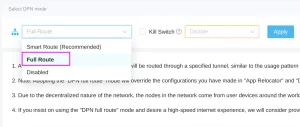
Deeper Connect by default uses a mode known as 'Smart Route'. The 'Smart Route' mode is primarily designed to bypass regional access restrictions on various websites or platforms, such as Netflix, BBC, and others. This mode only conceals or disguises the IP address for those domains that require IP verification, with the aim of maximizing the speed at which users can access these geo-blocked sites. If you wish to completely hide your IP, please go into the device's configuration interface and switch from 'Smart Route' to 'Full Route' mode. The specific steps are illustrated in the image below:
For more information on DPN and Smart Route, please see here:  https://deeper-network.medium.com/a-101-on-dpns-bd5e2b7c9e25

Deeper Connect achieves ad blocking by filtering DNS requests and HTTPS traffic. Therefore, to enable Deeper Connect to effectively 'monitor' these requests, you need to ensure two things:
1, Disable DoH:
Many browsers, such as Firefox, enable DoH (DNS over HTTPS) by default, encrypting DNS requests during transmission. Consequently, you need to disable the DoH feature in your browser so that Deeper Connect can monitor DNS requests and perform further content filtering.
Please log in to the admin console at 34.34.34.34 to check how to disable the DoH settings of the browser. learn more...

1. You can reset the password by using the reset button on the device. For detailed instructions, please refer to the following link:https://shop.deeper.network/blogs/tutorials/self-reset-your-deeper-connect-devices
2. If there are still questions, please keep your device online and reach us via support.deeper.network.

The hardware specifications of the Mini and Air are different (details can be found on the project page). In addition, Air supports wireless relay mode while the Mini is designed for at home use.

Yes, Deeper Connect can be set up in three ways that are introduced in the story section on the project page.
1, Virtual Wire mode: Modem -(cable)- Deeper Connect -(cable)- Router -(wifi)- Laptop/ Phones/ TV, etc;
2, AP Router mode: Modem/ Router -(cable)- Deeper Connect -(wifi)- Laptop/ Phones/ TV, etc;
3, Wireless Relay mode: Other AP Hotspots -(wifi)- Deeper Connect -(wifi)- Laptop/ Phones/ TV, etc.

You need a 2nd router. All-in-One -(cable)- Deeper Device -(cable)- 2nd router.

Protocols such as torrent blocking, adult content blocking, and a preset list of blacklisted websites prevent others from using your device for malicious activities.
In the rare case your device is used for malicious activities, internal logs are in place to prove you are not responsible for any wrongdoing.

It runs AtomOS, the world's first lock-free operating system, designed exclusively to run on Deeper Connect.

Please refer to this video for the first-time setup. Deeper Connect - Proper Setup & Reboot Sequence for Troubleshooting
If you still have the connection issue, please reach us via: support.deeper.network.

Please check the firmware version first and ensure it is higher than 1.1.17.
If your problem persists, please reach us via support.deeper.network.

Yes, a new Wi-Fi will be available for you to connect to.

All Deeper Connect products ship worldwide except to Mainland China.

The shipping time of the product will vary depending on the delivery address. We will provide the tracking number within 5-10 business days. A confirmation email will be sent once the order has shipped.

Please create a follow request on Zendesk at support.deeper.network providing order number and the email associated with this transaction.

You need to register an account at https://device-bsc.deeper.network/register first and follow the tutorial here to stake.
If you need further assistance, please submit a ticket at support.deeper.network and customer support will help you out.

It really depends on how you want to invest. We have eight different staking tiers you can choose from.
Please visit here for more information. You are always welcome to submit a ticket at support.deeper.network for further assistance.

Please make sure you have DPR and BNB token in your Metamask wallet.
You can find more information about mining rewards & rules here and the staking tutorial.
You are always welcome to submit a ticket at support.deeper.network for further assistance.

lease check if:
1. your device is consistently connected,
2. your device has been online for over 12 hours,
3. your On-chain status is "Yes" under the Mining/Wallet/Wallet Balance page at AtomOS,
4. your DPR balance is over 0.21DPR.
If you need further assistance, please submit a ticket at support.deeper.network.

Please make sure you meet the following criteria:
1) System uptime is at least 12 consecutive hours each day,
2) Share more than 10MB each day,
3) Pass 3 random heartbeat checks each day.

Please follow this tutorial to complete the burning process.

Please visit here  and submit a ticket at support.deeper.network. if you need further assistance.

There are two ways you can check your NFT:
1) Click the Deeper (DPER) Chain mainnet and connect your Deeper (DPER) wallet. You need to have your Deeper (DPER) wallet imported to the Polkadot extension on your browser in advance.
2) Log into your AtomOS, it is located at the top right corner of your avatar.

Please follow this and complete the burning process for NFTs.

Yes, pay once, 0 Subscription for life.

Import duty and taxes may apply to certain countries and areas. All duties and taxes are to be paid by the customer.

We will hold some discounted marketing campaigns, please follow our website and social media accounts.
At the same time, we will also send coupons to email subscribers at irregular times, so please subscribe to the email, you can't miss it.